How to set up your mobile camera for the best padel analytics
A simple guide to mounting your phone on the back glass with a suction cup holder to get the most accurate AI analysis of your padel match.
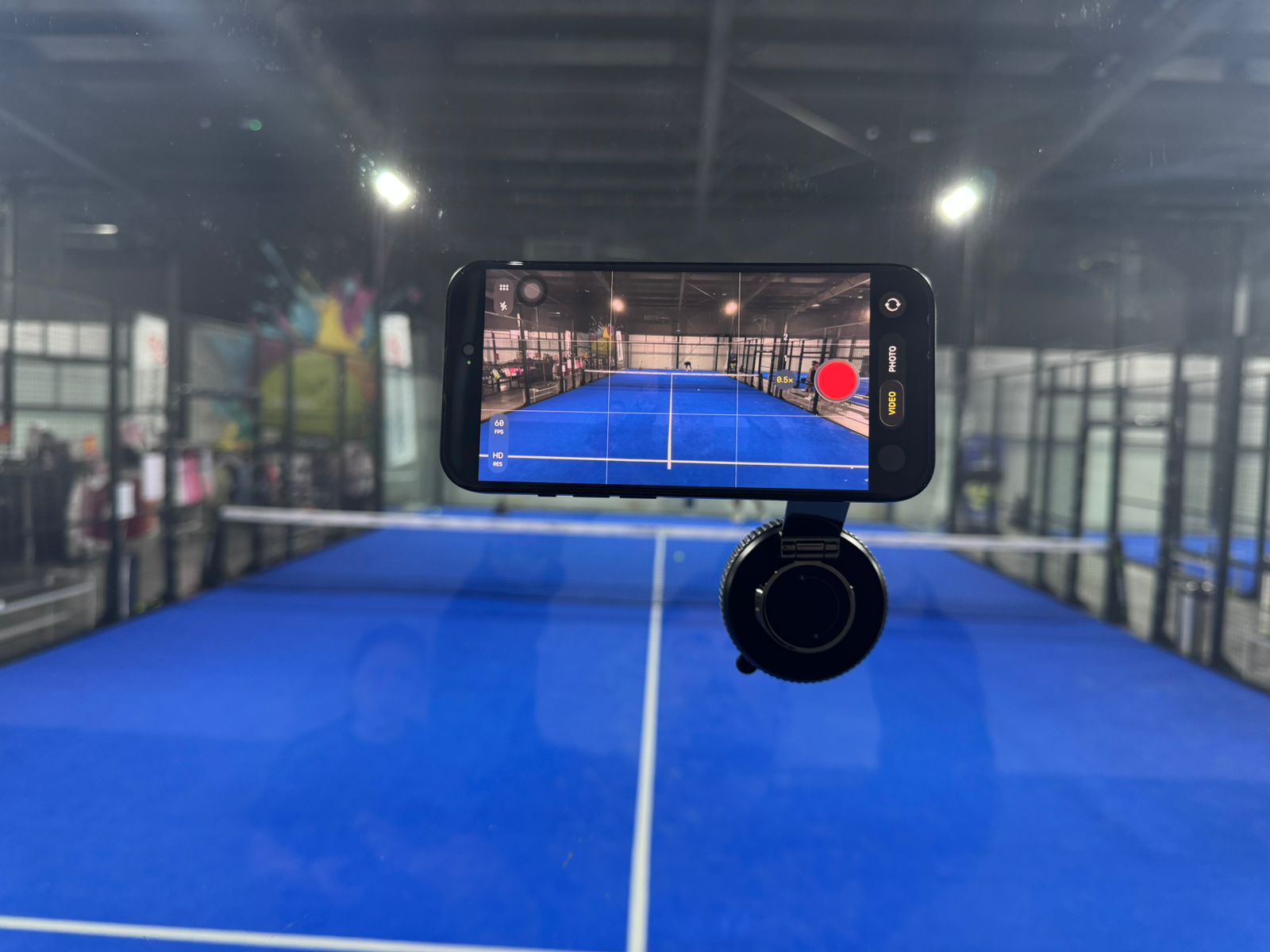
How to Set Up Your Camera for the Best Padel Analytics
Key takeaways:
- Mount your phone horizontally on the back glass with a suction cup holder and keep it fixed.
- Place it 2m+ high so both service lines are visible; use a wide-angle lens (0.5x) if available.
- Record 30–40 minutes of game footage—split longer matches into videos where players don't switch sides.
- Upload game footage only; trim out warm-ups for the most accurate analysis.
Getting great analytics starts before you even step onto the court. The way you position your camera has a big impact on how accurately our AI can track players, detect rallies, and generate insights. Here is everything you need to know to get it right.
Use a Suction Cup Holder on the Back Glass
The simplest and most effective setup is a suction cup phone holder attached to the back glass of the court. This keeps the camera perfectly still throughout the match — and a stable, fixed angle is one of the most important factors for accurate analysis.
Key rules for positioning:
- Keep it fixed. Do not move the camera during recording. Our AI is calibrated for a consistent viewpoint, so any mid-match repositioning will reduce accuracy.
- No side switches for players. Upload a video where teams stay on the same side of the court, like one full set or a few games. Also, left-right swaps (switching sides when your partner serves from "your side") confuse the player tracking model.
Height and Lens Matter
The higher you can place the camera, the better. Aim for 2 metres or more above the ground — this gives the AI a clear top-down view of both service lines, which is critical for position and movement analysis.
If your phone supports it, use the wide-angle lens (0.5x on iPhone). This captures more of the court in a single frame and reduces the chance of players disappearing out of frame during a rally.
How Long Should You Record?
You do not need to record an entire match to get meaningful insights. 30 to 40 minutes of game footage is enough. Our coaches confirm that players tend to repeat the same patterns and make the same mistakes throughout a match, so a solid half-hour gives the AI everything it needs to identify them.
If you do want to analyse a full match, simply split the footage into multiple videos where players don't switch sides and upload them separately.
Only Upload Game Footage
For the best results, skip warm-up and non-game moments before uploading. Warm-ups include movements and patterns that are not representative of match play, and including them can dilute the accuracy of your analysis.
You can cut out the warm-up in your phone's editor so that the recording begins before the first point and stops when the match ends. That is all the AI needs.
Quick Checklist
- Phone mounted horizontally (landscape) on the back glass with suction cup holder; camera fixed
- Players and teams don't switch sides in one uploaded video
- 2m+ height so both service lines are visible
- Wide angle lens (0.5x) if available
- 30–40 minutes of recording is enough; split longer matches into multiple videos
- Game footage only — no warm-up clips
Follow these steps and your analytics will be as accurate as possible. Ready to upload your first match? Get started here.